

This guide covers the full lifecycle of ActiveMQ dead-letter queue management: why messages end up there, how to configure per-destination DLQs on both ActiveMQ and Artemis, how to tune redelivery policies so your broker does not thrash under failure conditions, and how to operationally manage DLQ accumulation before it becomes a production incident.
What Triggers Dead Letter Queue Routing: The Four Redelivery Paths
Before configuring DLQ behavior, it is essential to understand exactly when Apache ActiveMQ sends a message to the dead letter queue. A message is redelivered and eventually routed to the DLQ when any of the following occurs:
- Transacted session rollback: A consumer calls session.rollback(), returning the message to the queue for redelivery.
- Transacted session closed before commit: The session closes before commit() is called, which is common in consumer crashes mid-processing.
- CLIENT_ACKNOWLEDGE with session.recover(): The consumer explicitly triggers redelivery for unacknowledged messages.
- Client connection timeout: The broker delivers a message, but the consumer’s connection times out before an acknowledgment is returned.
In all four cases, the message is placed back on its source queue, and the delivery counter increments. Once the delivery counter exceeds maximumRedeliveries, the broker receives a Poison ACK from the client: a signal that the message is considered unprocessable. The broker then routes the message to the configured dead letter destination.
The default maximum is 6 redeliveries in ActiveMQ(from the source code: DEFAULT_MAXIMUM_REDELIVERIES = 6). In Artemis, max-delivery-attempts defaults to 10 in the address settings.
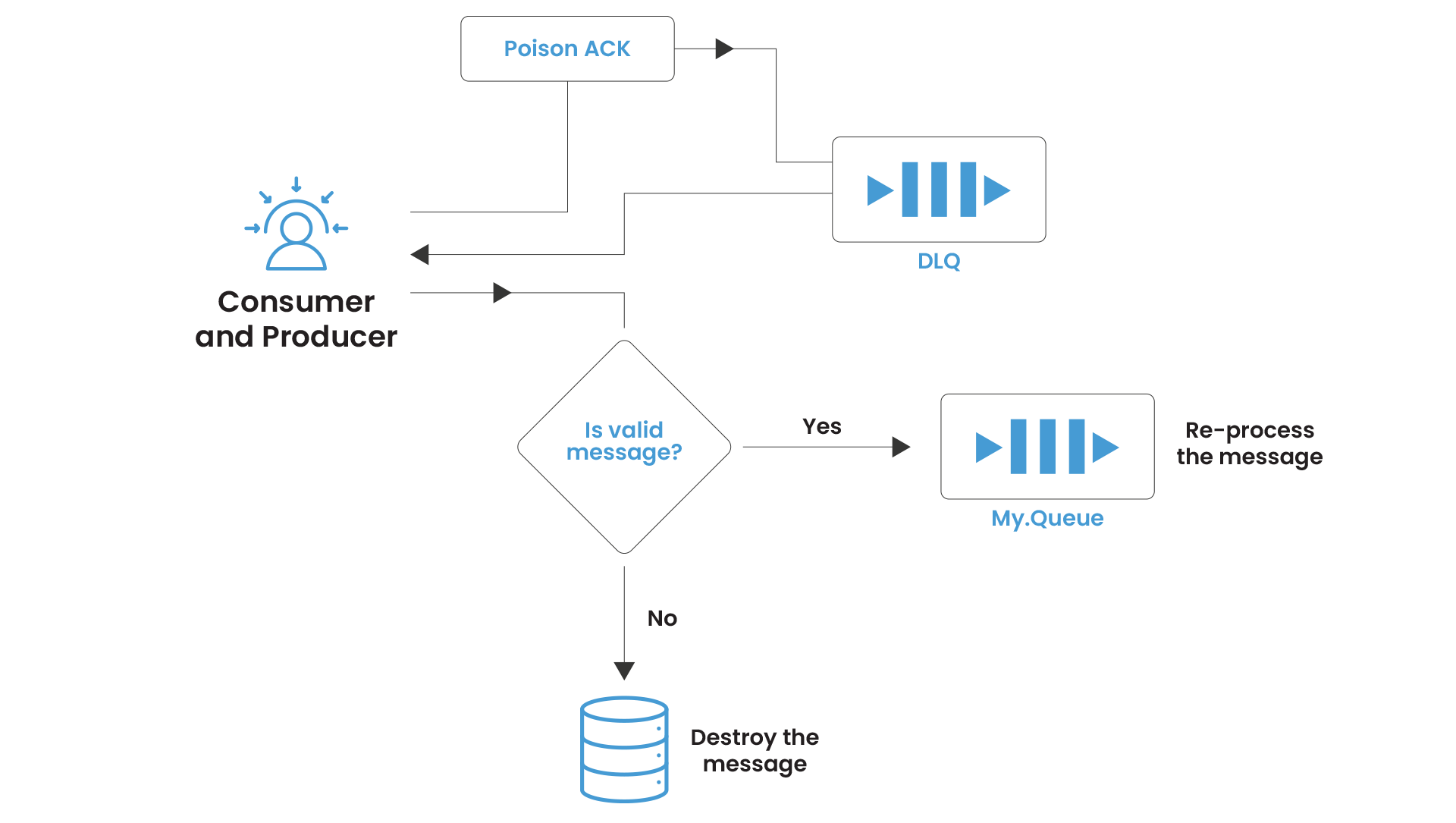
The Default DLQ Configuration: Why It Fails at Scale
Out of the box, Apache ActiveMQ routes all undeliverable messages to a single queue: ActiveMQ.DLQ. Every failed message from every queue in every application on that broker flows into this one destination.
The operational consequences are severe:
Triage is impossible. A message from orders.processing sits next to a message from notifications.email sits next to a message from payments.settlement. There is no structural way to filter by source without parsing message headers.
Alert thresholds are meaningless. If ActiveMQ.DLQ depth hits 1,000; you cannot tell whether those are 1,000 failed payment settlements or 1,000 failed marketing emails without manual inspection.
Reprocessing is dangerous. Bulk-moving DLQ messages back to their source queues requires knowing what came from where, and the native tools make this harder than it needs to be.
The fix is straightforward, but it requires explicit configuration that is not enabled by default.
ActiveMQ Dead Letter Queue Configuration:
The individualDeadLetterStrategy
The individualDeadLetterStrategy is the production-grade dead-letter queue configuration for ActiveMQ . Applied via a wildcard policy entry, it routes failed messages from each source queue to a dedicated DLQ with a consistent naming convention.
| <!– activemq.xml — broker-level destinationPolicy –> <broker xmlns=”http://activemq.apache.org/schema/core”> <destinationPolicy> <policyMap> <policyEntries> <!– Individual DLQ per queue for all queues –> <policyEntry queue=”>”> <deadLetterStrategy> <individualDeadLetterStrategy queuePrefix=”DLQ.” useQueueForQueueMessages=”true” processNonPersistent=”true” processExpired=”false”/> </deadLetterStrategy> </policyEntry> <!– Individual DLQ for topic subscriptions –> <policyEntry topic=”>”> <deadLetterStrategy> <individualDeadLetterStrategy topicPrefix=”DLQ.” useQueueForTopicMessages=”true”/> </deadLetterStrategy> </policyEntry> </policyEntries> </policyMap> </destinationPolicy> </broker> |
With this configuration, a message from orders.processing that exhausts its redelivery attempts lands in DLQ.orders.processing, not the shared sink. Operations teams can now alert on per-queue DLQ depth independently and route remediation work to the team that owns each service.
Key parameters explained:
| Parameter | Default | Recommended | Rationale |
| queuePrefix | “ActiveMQ.DLQ” | “DLQ.” | Creates named per-source queues |
| useQueueForQueueMessages | false | true | Ensures DLQ is a queue, not a topic |
| processNonPersistent | false | true | Catches transient message failures |
| processExpired | true | false | Keeps DLQ clean of TTL-expired noise |
The processExpired Trap
One parameter deserves special attention: processExpired. By default, it is true that expired messages (those that hit their TTL) flow into the dead letter queue alongside genuinely poison messages. In any system with TTL-based message expiry, this silently floods the DLQ with messages that are not errors at all, burying the real failures.
Set processExpired=”false” on your dead-letter queue strategy unless you have a specific operational reason to retain expired messages. If you do need to retain expired messages for audit purposes, route them to a separate expiry destination rather than mixing them with failure-mode DLQ messages.
DLQ Expiry: The Loop Risk
From ActiveMQ 5.12 onward, deadLetterStrategy supports an expiration attribute (in milliseconds) so that DLQ messages do not accumulate indefinitely. Be extremely selective in applying this: never apply an expiration policy using a wildcard that matches dead letter destinations themselves.
If a DLQ entry expires and is forwarded to another DLQ with expiry, and the audit window is exceeded, you will introduce a routing loop that can be very difficult to diagnose.
Apply DLQ expiry only to specific named destinations where the business logic explicitly permits discarding unprocessable messages after a defined retention window.
ActiveMQ DLQ Configuration: Tuning the Redelivery Policy
The redelivery policy is where most production misconfiguration happens. The default, six immediate retries with no delay, is appropriate for a local development environment and wrong for almost every production workload.
The Thundering Herd Problem
When a downstream system (a database, an external API, a dependent service) fails, every consumer attempting to process messages will fail simultaneously. With immediate retries, those consumers will hammer the failing system six times per message before backing off to the DLQ. At high message volumes, this is not retrying, it is a self-inflicted denial-of-service attack on an already-degraded dependency.
Exponential backoff with jitter is the correct pattern. Here is a production-grade redelivery policy set at the broker level via the redeliveryPlugin:
| <!– activemq.xml — broker plugin for server-side redelivery –> <broker schedulerSupport=”true”> <plugins> <redeliveryPlugin fallbackToDeadLetter=”true” sendToDlqIfMaxRetriesExceeded=”true”> <redeliveryPolicyMap> <redeliveryPolicyMap> <!– High-value queues: slow, deep retry –> <redeliveryPolicyEntries> <redeliveryPolicy queue=”payments.>” maximumRedeliveries=”10″ initialRedeliveryDelay=”2000″ redeliveryDelay=”2000″ useExponentialBackOff=”true” backOffMultiplier=”2.0″ maximumRedeliveryDelay=”300000″ useCollisionAvoidance=”true”/> <!– Standard queues: moderate retry –> <redeliveryPolicy queue=”orders.>” maximumRedeliveries=”5″ initialRedeliveryDelay=”1000″ redeliveryDelay=”1000″ useExponentialBackOff=”true” backOffMultiplier=”2.0″ maximumRedeliveryDelay=”60000″/> </redeliveryPolicyEntries> <!– Default fallback for all other queues –> <defaultEntry> <redeliveryPolicy maximumRedeliveries=”5″ initialRedeliveryDelay=”1000″ redeliveryDelay=”1000″ useExponentialBackOff=”true” backOffMultiplier=”2.0″ maximumRedeliveryDelay=”60000″/> </defaultEntry> </redeliveryPolicyMap> </redeliveryPolicyMap> </redeliveryPlugin> </plugins> </broker> |
Important: schedulerSupport=”true” must be enabled on the broker element for the redeliveryPlugin to function. Broker-side redelivery is implemented via the broker’s scheduler. If schedulerSupport is false, the plugin silently does nothing, messages will still go to the dead letter queue, but the backoff delays will not apply.
Redelivery Policy Parameter Reference
| Parameter | Default | Description |
| maximumRedeliveries | 6 | Max attempts before Poison ACK. Set -1 for infinite (use with caution). |
| initialRedeliveryDelay | 1000ms | Wait time before first retry |
| redeliveryDelay | 1000ms | Base delay for subsequent retries |
| useExponentialBackOff | false | Enable exponential delay growth |
| backOffMultiplier | 5.0 | Multiplier applied each retry when backoff enabled |
| maximumRedeliveryDelay | -1 (no cap) | Cap on maximum delay — always set this |
| useCollisionAvoidance | false | Add ±15% jitter — prevents synchronized retry storms |
The maximumRedeliveryDelay parameter deserves emphasis. Without it, exponential backoff with a multiplier of 5.0 can produce delays measured in hours for deeply retried messages. Always cap it to a value that makes operational sense for your SLA, typically 5–10 minutes for most workloads.
Is Your DLQ Growing Without a Clear Pattern?
Artemis Configuration: Dead Letter Addresses and Address Settings
Apache ActiveMQ Artemis handles undeliverable messages differently from Classic. The configuration lives in broker.xml under address-settings, and the DLQ concept maps to a dead-letter-address, an Artemis address (not a Classic queue) that receives failed messages.
| <!– broker.xml — address-settings section –> <address-settings> <!– Global fallback for all addresses –> <address-setting match=”#”> <dead-letter-address>DLA</dead-letter-address> <auto-create-dead-letter-resources>true</auto-create-dead-letter-resources> <dead-letter-queue-prefix>DLQ.</dead-letter-queue-prefix> <dead-letter-queue-suffix></dead-letter-queue-suffix> <max-delivery-attempts>5</max-delivery-attempts> <!– Exponential backoff: 2s → 4s → 8s → … capped at 5 min –> <redelivery-delay>2000</redelivery-delay> <redelivery-delay-multiplier>2.0</redelivery-delay-multiplier> <max-redelivery-delay>300000</max-redelivery-delay> <!– ±10% jitter to prevent retry synchronization –> <redelivery-collision-avoidance-factor>0.1</redelivery-collision-avoidance-factor> <!– Expiry messages go to a separate expiry address, not the DLQ –> <expiry-address>ExpiryQueue</expiry-address> <auto-create-expiry-resources>true</auto-create-expiry-resources> <expiry-queue-prefix>EXP.</expiry-queue-prefix> </address-setting> <!– High-value address: deeper retry, longer backoff –> <address-setting match=”payments.#”> <dead-letter-address>DLA</dead-letter-address> <auto-create-dead-letter-resources>true</auto-create-dead-letter-resources> <dead-letter-queue-prefix>DLQ.</dead-letter-queue-prefix> <max-delivery-attempts>10</max-delivery-attempts> <redelivery-delay>5000</redelivery-delay> <redelivery-delay-multiplier>2.0</redelivery-delay-multiplier> <max-redelivery-delay>600000</max-redelivery-delay> </address-setting> </address-settings> |
Critical operational note on auto-create-dead-letter-resources: This attribute was added in a later Artemis version and requires correct placement within the address-setting element’s schema-defined ordering to avoid XML validation errors at broker startup. If your Artemis version does not recognize the element, it will fail to start with a SAXParseException. Verify the attribute is supported in your specific Artemis version before deploying to production.
The Dead Letter Address vs. Dead Letter Queue Distinction
Teams migrating from ActiveMQ to Artemis frequently conflate the two concepts. In ActiveMQ, the dead letter queue is a literal JMS queue. In Artemis, the dead letter address is an address in the broker’s address model, it can be backed by one or more queues, depending on your routing type configuration.
This matters for monitoring: DLQ messages on Artemis must be observed at the address level and the queue level, whereas ActiveMQ only requires queue-depth monitoring. If you are migrating monitoring dashboards from ActiveMQ to Artemis, this distinction will affect every dead letter alert you have configured.
The OpenWire Client Override: A Common Gotcha on Artemis
This is the most frequently reported DLQ behavior discrepancy when teams run OpenWire JMS clients against an Artemis broker: the client-side RedeliveryPolicy overrides the broker-side address-settings.
When an OpenWire JMS client connects to Artemis, it manages its own redelivery loop using its RedeliveryPolicy. The client does not tell the broker that redelivery is happening, from the broker’s perspective, the message is simply in-flight. The broker’s max-delivery-attempts does not increment. Only when the client exhausts its own redelivery limit and sends a Poison ACK does the broker see a failure and route to the dead letter address.
The practical consequence: if your OpenWire client has maximumRedeliveries=6 (the Apache ActiveMQ default) and your Artemis address-settings has max-delivery-attempts=10, you will see DLQ messages appear after 6 attempts, not 10. The client wins.
To align behavior: set the redelivery policy on the connection factory to match your broker-side intent, or use the Artemis CORE protocol with native clients that respect broker-side redelivery settings.

Operational DLQ Management: From Alerting to Reprocessing
Monitoring Dead Letter Queue Depth
A dead letter queue that fills silently is not a safety net, it is a message graveyard. DLQ depth is one of the highest-signal operational metrics in any Apache ActiveMQ deployment and should be the first custom alert your team configures.
Key JMX attributes to monitor per dead letter queue:
- QueueSize – total DLQ messages currently sitting in the dead letter destination
- EnqueueCount – rate at which new messages are arriving (rate spike = new failure mode)
- DequeueCount – rate at which messages are being reprocessed or discarded
- MemoryPercentUsage – DLQ memory consumption (large message payloads can fill this quickly)
Alert thresholds to configure:
- Warning: DLQ depth > 0 for more than 15 minutes (new messages arriving, no processing)
- Critical: dead letter queue depth growing faster than it is draining (accumulation rate > 0)
- Emergency: DLQ for a high-priority destination (e.g., DLQ.payments.>) receives any message
We cover the full JMX monitoring setup — including how to configure these alerts in MeshIQ Console with custom thresholds per destination — in our post on Monitoring & Alerting Setup.
See Every DLQ Across Your Broker Fleet in One View
Inspecting DLQ Messages Before Reprocessing
Before reprocessing, always inspect. The most common mistake in dead letter queue remediation is bulk-moving DLQ messages back to the source queue without diagnosing why they failed, which immediately re-queues the same unprocessable messages.
DLQ messages carry enriched headers that reveal their history:
- originalExpiration – the message’s original TTL before dead letter routing
- originalDeliveryMode – persistence mode of the original message
- dlqDeliveryFailureCause – (Artemis) the exception or reason that triggered dead letter address routing
- _AMQ_ORIG_ADDRESS – (Artemis) the original address the message was sent to
- JMSXDeliveryCount – how many delivery attempts were made
Use these headers to triage systematically. Messages from the same producer with the same failure cause indicate a systematic integration problem, not a transient error. Messages with JMSXDeliveryCount = 1 that landed in the DLQ indicate a consumer that crashed immediately on first delivery, likely a deserialization or schema issue.
Reprocessing Strategies for DLQ Messages
Once the root cause is understood and resolved, there are three approaches to reprocessing DLQ messages:
Option 1: JMX moveMessageTo() – targeted, per-message.
Via JMX, QueueViewMBean.moveMessageTo(messageId, destinationName) moves a specific message from the dead letter queue to a target destination. This is the safest approach for surgical reprocessing of specific message IDs.
| // Example: move a specific message from DLQ back to source queue ObjectName dlqName = new ObjectName( “org.apache.activemq:type=Broker,brokerName=localhost,” + “destinationType=Queue,destinationName=DLQ.orders.processing”); QueueViewMBean dlq = (QueueViewMBean) MBeanServerInvocationHandler .newProxyInstance(mbeanServer, dlqName, QueueViewMBean.class, true); // Move single message by ID dlq.moveMessageTo(“ID:host-61616-timestamp-1:1:1:1”, “orders.processing”); // Or retryMessages() to move all messages matching a selector dlq.retryMessages(); |
Option 2: JMS Consumer + Republish – transform then reprocess.
When DLQ messages need enrichment or correction before reprocessing (payload schema correction, header addition, routing override), write a targeted consumer on the dead letter destination that reads, transforms, and republishes to the original or an alternative destination. This approach gives you a code audit trail for the remediation.
Option 3: meshIQ Console DLQ Management – operational, no-code.
For teams without the capacity to write JMX automation scripts, meshIQ Console provides a GUI-based interface for browsing, filtering, moving, and discarding DLQ messages with message header inspection and bulk operations support.
ActiveMQ vs. Artemis DLQ: Key Behavioral Differences at a Glance
| Behavior | ActiveMQ | Artemis |
| Configuration file | activemq.xml (destinationPolicy) | broker.xml (address-settings) |
| DLQ concept name | Dead Letter Queue | Dead Letter Address |
| Default DLQ | ActiveMQ.DLQ (shared) | None — messages discarded if no DLA configured |
| Per-destination DLQ | individualDeadLetterStrategy | auto-create-dead-letter-resources + prefix |
| Expiry vs. DLQ separation | processExpired=”false” | Separate expiry-address — clean by design |
| Non-persistent message handling | Excluded by default (processNonPersistent=”false”) | Follows max-delivery-attempts regardless of persistence |
| Redelivery authority (OpenWire) | Client-side RedeliveryPolicy | Client-side RedeliveryPolicy overrides broker address-settings |
| Redelivery authority (CORE) | N/A | Broker-side address-settings respected |
| Broker-side scheduler required | Yes (for redeliveryPlugin) | No (redelivery managed natively) |
The most critical row: if you are running OpenWire JMS clients against Artemis, client-side redelivery wins. This is not a bug, it is a documented architectural consequence of how OpenWire handles redelivery independently of the broker’s dead letter address settings.
It requires explicit alignment of client-side RedeliveryPolicy with broker-side address-settings to achieve consistent DLQ behavior.
In our foundational post on Apache ActiveMQ vs Apache Artemis architecture, we covered the broader protocol model differences that explain why this client-override behavior exists and affects dead letter queue routing across the two brokers.
DLQ Anti-Patterns: What Not to Do
1. Anti-pattern 1: Leaving the shared ActiveMQ.DLQ in place.
The shared dead letter queue is a debugging obstacle, not a feature. Replace it with individualDeadLetterStrategy on day one of your production deployment, not after an incident.
2. Anti-pattern 2: Setting maximumRedeliveries=”-1″ without a delay.
Infinite retries with zero delay creates an infinite tight loop that consumes CPU, spams consumer logs, and blocks other messages on the queue from being processed. If you need infinite retries, always pair with exponential backoff and a maximumRedeliveryDelay cap.
3. Anti-pattern 3: Applying DLQ expiry globally with a wildcard.
If you configure <expiration> on a wildcard policyEntry that matches your dead letter destinations, expired DLQ messages will route back into the DLQ and potentially loop. Apply expiry only to specific, named non-DLQ destinations.
4. Anti-pattern 4: Bulk-reprocessing without diagnosing the root cause.
Moving 10,000 DLQ messages back to the source queue when the downstream system is still unhealthy just creates 10,000 new dead letter queue entries within minutes, and may trigger flow control on the source queue. Diagnose first, remediate second.
5. Anti-pattern 5: Ignoring dead letter queue monitoring entirely.
Slow consumers, serialization failures, and schema mismatches are among the most common DLQ triggers. — and we cover all three in our posts on Slow Consumer Detection & Handling and on Monitoring & Alerting Setup. A DLQ that never alerts is a silent message loss event.
Want a Production-Ready DLQ Configuration Reviewed?
Stop Treating the DLQ as a Safety Net
The dead letter queue is not a safety net, it is a symptom tracker. A well-managed Apache ActiveMQ deployment should have DLQ depth hovering near zero most of the time, with any accumulation triggering an immediate alert and investigation.
The ActiveMQ dead letter queue configuration work to get there is not complex: individual DLQ strategies per destination, a production-grade redelivery policy with exponential backoff, and dead letter depth alerting wired into your monitoring stack. What makes it hard in practice is that most teams configure it after the first DLQ incident rather than before.
meshIQ provides both the operational tooling through meshIQ Console’s dead letter queue monitoring and alerting features and the enterprise expertise to get your Apache ActiveMQ DLQ configuration right from the start.
Get your ActiveMQ dead letter queue configuration reviewed by our team → Talk to an Expert
Frequently Asked Questions
A dead letter queue (DLQ) in Apache ActiveMQ is the destination where messages are routed after exhausting their maximum redelivery attempts. In Classic, the default is a single shared queue called ActiveMQ.DLQ. In Artemis, DLQ messages are sent to a configured dead-letter-address, if none is configured, undeliverable messages are silently discarded.
Add an individualDeadLetterStrategy with queuePrefix=”DLQ.” and useQueueForQueueMessages=”true” inside a wildcard policyEntry queue=”>” in the destinationPolicy of activemq.xml. This ActiveMQ dead letter queue configuration routes failures from each source queue to a dedicated DLQ.{queuename} destination, enabling per-service alerting and triage.
Apache ActiveMQ Classic defaults to 6 redelivery attempts (maximumRedeliveries=6) with a 1-second initial delay and no exponential backoff. The backOffMultiplier is set to 5.0 but is inactive unless useExponentialBackOff=true is explicitly set. For production workloads, always configure explicit backoff with a maximumRedeliveryDelay cap to prevent DLQ flooding under downstream failure.
Use JMX QueueViewMBean.moveMessageTo(messageId, destination) for targeted single-message moves, retryMessages() for bulk DLQ message moves, or write a JMS consumer on the dead letter destination that reads, corrects, and republishes messages. Always diagnose the root cause of failure before reprocessing to avoid immediately re-failing the same DLQ messages.
ActiveMQ’s default sharedDeadLetterStrategy has processNonPersistent=”false”, non-persistent messages are discarded on failure rather than routed to the dead letter queue. Set processNonPersistent=”true” on your dead-letter queue strategy if non-persistent messages carry operational significance that warrants failure capture.