


Apache Kafka® has become the backbone of modern event-driven architectures, but for many engineers, the journey from deployment to production-ready performance begins with a single, deceptively simple question: “How many partitions should I set for this topic?”
In the world of distributed systems, partitions are the primary unit of parallelism. Choose too few, and you create a bottleneck that can’t be resolved by simply throwing more hardware at the problem. Choose too many, and you introduce unnecessary operational complexity and latency. Finding the “Goldilocks” number requires a balance between throughput requirements, ordering guarantees, and long-term maintenance costs.
In this post, we’ll break down the factors you need to weigh to find the right number for your specific use case.
1. What Partitions Actually Determine
In Apache Kafka®, partition count is not just a storage unit — it defines core system characteristics.
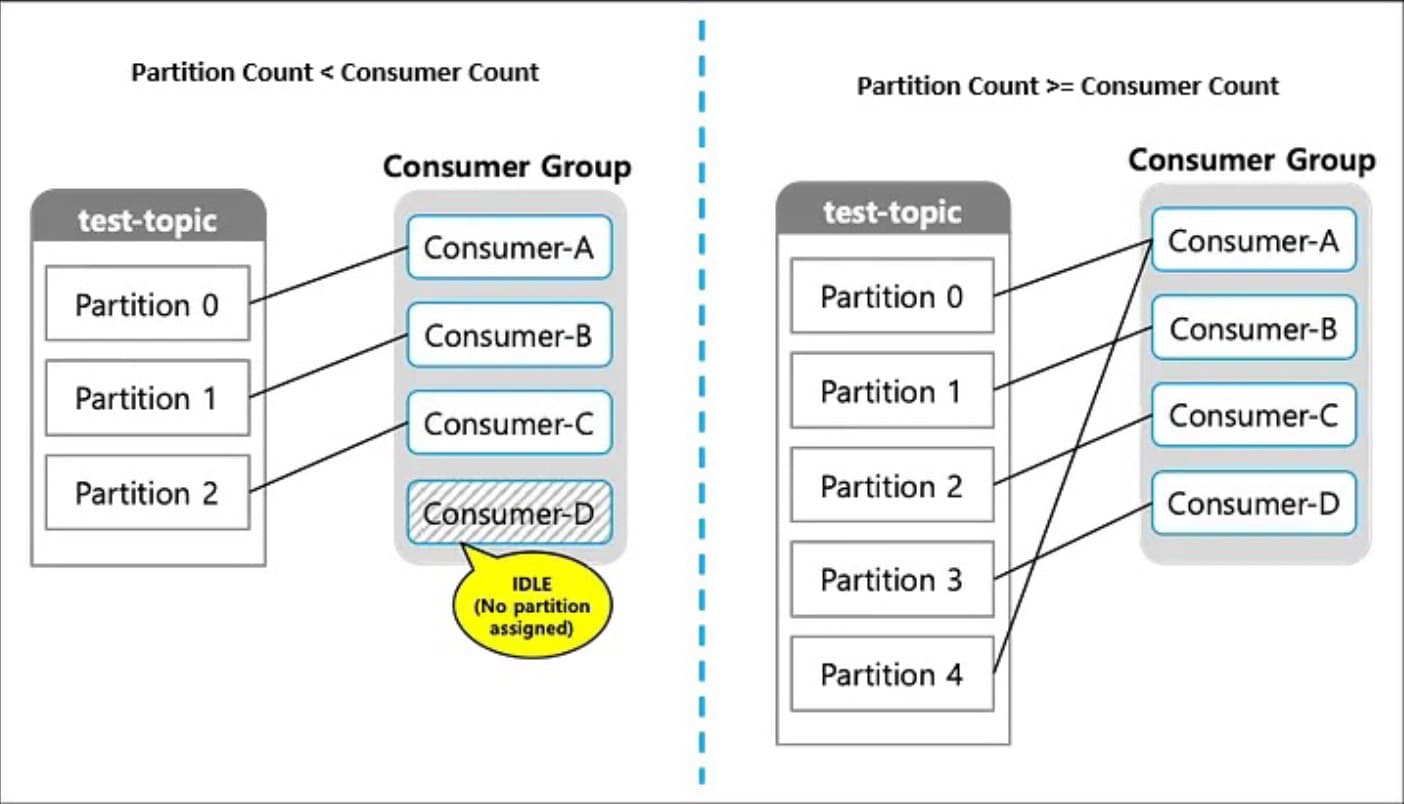
- Maximum Consumer Parallelism: Within the same consumer group, a single partition can only be consumed by one consumer at a time. This is the “hard ceiling” for your scaling.
- Scope of Message Ordering: Ordering is only guaranteed within a partition. If you need strict chronological processing for a specific ID, those messages must land in the same partition.
- Throughput and Latency: Directly tied to the degree of parallel processing possible.
- Operational Complexity: Rebalancing time, metadata overhead, and failure response costs all scale with partition count.
2. How to Decide on Partition Count
2.1 Define Your Ordering Scope
First, clarify how far your ordering guarantee needs to extend.
- Key-level ordering required: Distribute messages by key across partitions. This allows related events (like all actions by User A) to stay in order.
- Global ordering across the entire topic required: You must use 1 partition. (Note: This is not recommended for production scenarios requiring high scale.)
2.2 Target Consumer Parallelism
Next, determine how many consumers need to run in parallel at peak load.
- Partition count should be equal to or greater than your target maximum consumer count.
- Avoid over-provisioning. More partitions than needed add operational cost without proportional benefit.
Anti-pattern: A practice that looks reasonable on the surface but causes real problems—such as performance degradation or stability issues—especially as the system ages.
2.3 Target Throughput
Consider the following metrics together:
- Messages per second (TPS)
- Average message size
- Consumer processing characteristics: Is it CPU-bound or I/O-bound (waiting on external DBs or APIs)?
Note: Increasing partition count improves CPU-bound parallel processing, but it does not resolve external system bottlenecks.
2.4 The Summary Formula
To simplify the math, use this formula to find your baseline: Target Throughput = (Single Consumer Throughput × Partition Count) + α
α = operational buffer accounting for rebalancing, GC pauses, and transient processing delays.
Example:
- Target throughput: 1,000 TPS
- Single consumer throughput: 100 TPS
- Recommended partition count: Minimum 10, approximately 12–15 when including an operational buffer.
2.5 Important Cautions
- The One-Way Street: Partition count can be increased but never decreased.
- Key Re-distribution: Increasing partitions on a live topic will change where specific keys land, breaking historical key-level ordering guarantees.
- Broker Capacity: Every partition consumes file handles and memory. Higher counts lead to longer rebalancing times and potential delays during broker restarts.
3. Practical Decision Criteria
| Perspective | Question |
|---|---|
| Ordering | Is key-level ordering required for your business logic? |
| Parallelism | How many consumers need to run concurrently at peak? |
| Throughput | What are the current and projected TPS and message size? |
| Scalability | Can the bottleneck be resolved by scaling out consumers? |
| Operations | Can we afford the rebalancing cost during live operation? |
4. Common Anti-patterns to Avoid
- “The Kitchen Sink”: Creating 100+ partitions from the start, “just in case.”
- Ignoring Keys: Increasing partitions without a proper key design, leading to uneven data distribution (hot partitions).
- Masking Slow Code: Attempting to solve slow external API calls by adding more partitions instead of optimizing the consumer logic.
5. The Recommended Approach
- Start conservatively. It is much easier to add partitions later than to manage 1,000 idle ones today.
- Monitor obsessively. Use lag monitoring to identify where the actual bottleneck resides.
- Scale consumers first. If your partitions are already higher than your consumer count, simply add more instances of your application.
- Increase partitions as a last resort. Always assess the full impact on downstream systems before clicking “save.”
Conclusion: Rationale Over Numbers
The right number of partitions for an Apache Kafka® topic is the minimum value that satisfies your consumer parallelism goals and throughput requirements.
Partitions define the boundary of your parallel world. They must be determined in conjunction with your key design and with a clear eye on operational overhead. Remember that in Apache Kafka®, “more” is not always “better”—it is simply “different.”
- Partitions are not a universal performance lever; they are a structural choice.
- The starting question shouldn’t be “What number should I pick?” but rather “How much parallel processing do I actually need?”
The best Apache Kafka® architecture isn’t the one with the most partitions; it’s the one where the rationale behind the partition count is as clear as the data flowing through it.
TL;DR: The Formula for Success
If you take away nothing else, keep this formula in your pocket: Target Throughput = Consumer Throughput × Partition Count + α